
![[JLD] Polls op scherm (Premium)](https://www.ladyd.eu/images/2025/PollsOpStream_ProductImage.png)
When you create a poll via Twitch, you'll see it appear on your screen. If the poll is deleted or ends, it will automatically disappear from the screen. This way, you can encourage your viewers to vote on your poll! This plugin uses all 5 possible options that Twitch provide to enter an answer. Also it's supporting multi-language since version 1.0.2!
Required software in OBS Studio:
Make sure you have the following plugins installed in your OBS Studio, otherwise the Streamer.Bot plugin will not work.
These plugins are free and can be downloaded from the OBS Studio website.
- Source Copy Plugin https://obsproject.com/forum/resources/source-copy.1261/
- Move Transition Plugin https://obsproject.com/forum/resources/move.913/
FIRST-TIME INSTALLATION AND CONFIGURATION:
In OBS-Studio
Use Source Copy to load the scene "FX-SCENE-SB-Polls.json" from this download. This will import everything needed to display the polls on your screen.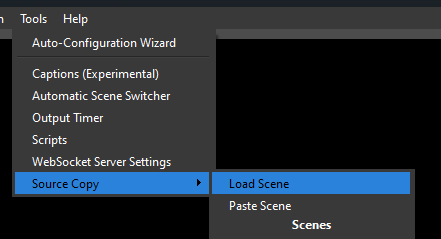
If this is successful, you will now have an additional scene in your collection named "FX-SCENE-SB-Polls".
In Streamer.bot
In streamer.bot, click the "Import" button in the top left corner. You can now drag the file "JLD_POS_PREMIUM" into the "Import String" field.
This will import 8 actions and one cue for the Polls on Screen feature. Then click Import to load the plugin.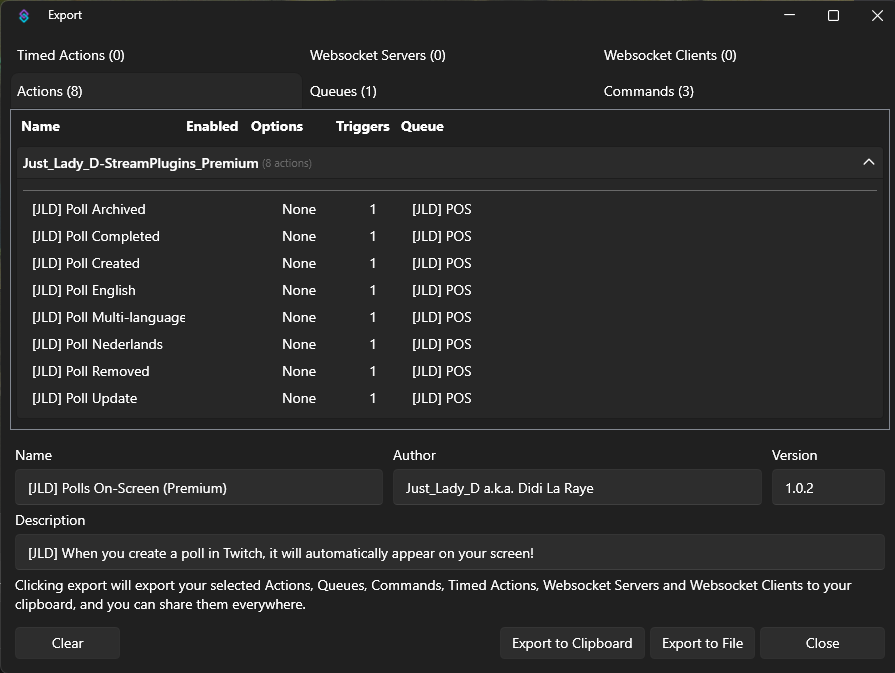
Plugin Configuration:
This plugin should not require any further configuration.
You can, however, customize the text displayed in your chat. You can also change the background of the Poll on Screen to your own color theme. To adjust this, go to OBS Studio and select the scene "FX-SCENE-SB-Polls." When you open the "Poll_Keuzes_Folder" folder, you'll see the background "Poll_achtergrond." You can customize this by adding a color correction filter, etc.
New commands:
To set the language in the plugin, there are now three new commands that streamers (and moderators) can use.
!pollnl Sets the language to Dutch.
!polleng Sets the language to English.
!pollmulti Sets the language to both Dutch and English.
Customizable text:
If you want to customize text to fit your stream, you can find the messages in the purple folders in the code labeled "Language Files." Be sure to include any variables in the custom text as well, otherwise the plugin will no longer work.
INSTALLATION AND CONFIGURATION FOR UPDATE:
In the update from version 0.2.6.0 to 0.2.8.0 to 1.0.x, the OBS Studio sources were NOT updated. The changes are all in the StreamerBot code itself. Therefore, with this update, you only need to perform the steps below.
In Streamer.Bot
Remove the following actions from StreamerBot:
- Poll Aangemaakt
- Poll Gearchiveerd
- Poll Klaar
- Poll Update
- Poll Verwijderd
Once these are removed, click the "Import" button in the top left corner. You can now drag the file "JLD_POS_PREMIUM" into the "Import String" field. This will import the eight custom actions and one cue for the Polls on Screen feature. Then click Import to load the plugin.
If all went well, the Poll on Screen will now disappear after a specified time (10 seconds by default) when a poll is ended, deleted, or archived. Also the language will be active from now on.
New commands:
To set the language in the plugin, there are now three new commands that streamers (and moderators) can use.
!pollnl Sets the language to Dutch.
!polleng Sets the language to English.
!pollmulti Sets the language to both Dutch and English.
Customizable text:
If you want to customize text to fit your stream, you can find the messages in the purple folders in the code labeled "Language Files." Be sure to include any variables in the custom text as well, otherwise the plugin will no longer work.
Changelog:
Versie 1.0.2
Aangepast:
- Duidelijke kleur indicaties voor beter overzicht
- Handleiding geüpdatet naar nieuwe standaard.
Toegevoegd:
- Multi-Language support!
- Engelse taal
- Voorbereiding voor meer talen toegevoegd
- 3 nieuwe commando's om de taal te besturen
Versie 1.0.1
Aangepast
- Nieuwe Streamer.Bot logica verwerkt
Fix
- Onjuiste waardes tonen bij minder dan 5 keuzes
Versie 1.0.0
Nieuw
- Geoptimaliseerd voor Streamer.Bot 1.0.0
Aangepast
- Handleiding bijgewerkt
- Duidelijke kleuren aanduidingen
Fix
- Fout in volgorde code opgelost als Streamer.Bot crasht
Versie 0.2.8.0
Nieuw
- Delay kan nu handmatig aangepast worden naar eigen wens.
Aangepast
- Delay aanpassingen voor verdwijnen Poll op scherm
- Handleiding aangepast
- Structuur verbeterd voor komende updates
- Export gereed voor Streamerbot 0.2.8.x
Versie 0.2.6.0
Release van deze plugin